Dimona declaration for student contracts - FAQ |

|

|

|
|
Dimona declaration for student contracts - FAQ |
|
|

|
Dimona declaration for student contracts - FAQ |
|
|
|
|
Dimona declaration for student contracts - FAQ |
|
|
|
Note:
From 01/01/2023 to 31/12/2024, the number of low-cost hours (students on solidarity contribution) was increased from 475 hours to 600 hours. From 01/01/2025, the student quota is increased to 650 hours.
On this page you find more information on
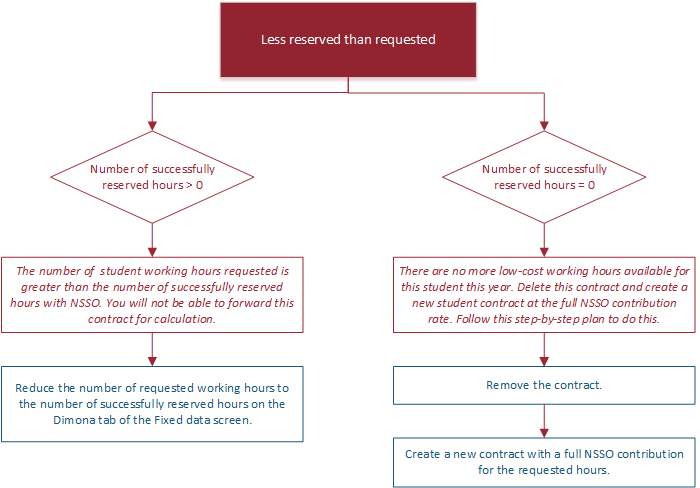
oLess hours succesfully reserved than requested
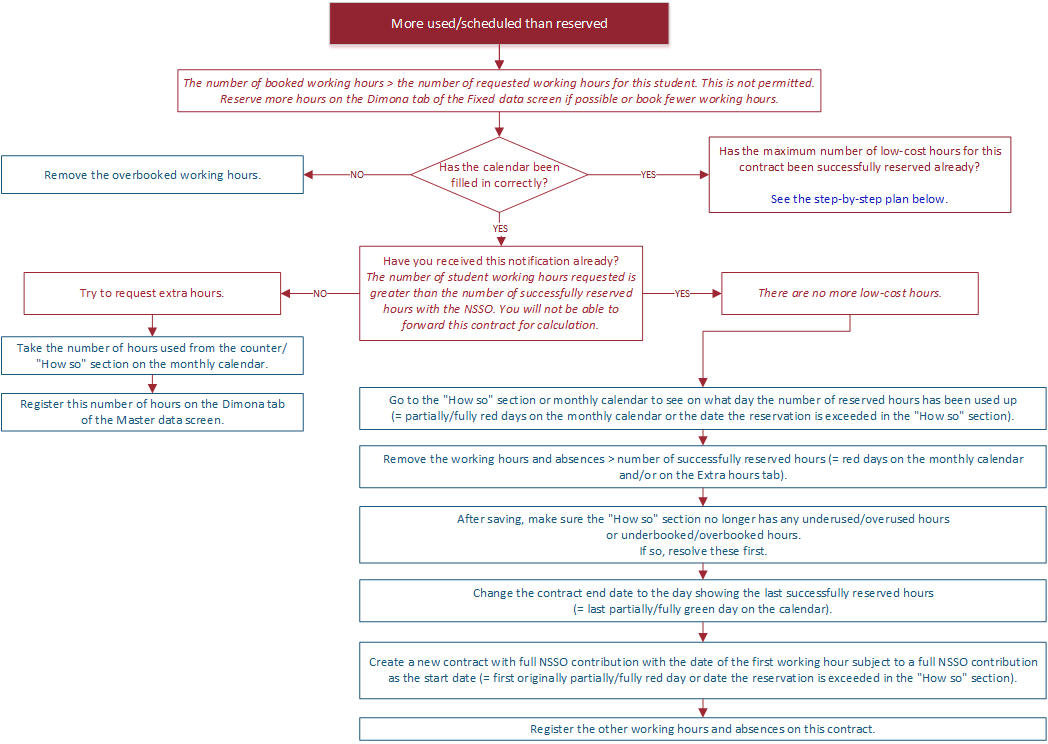
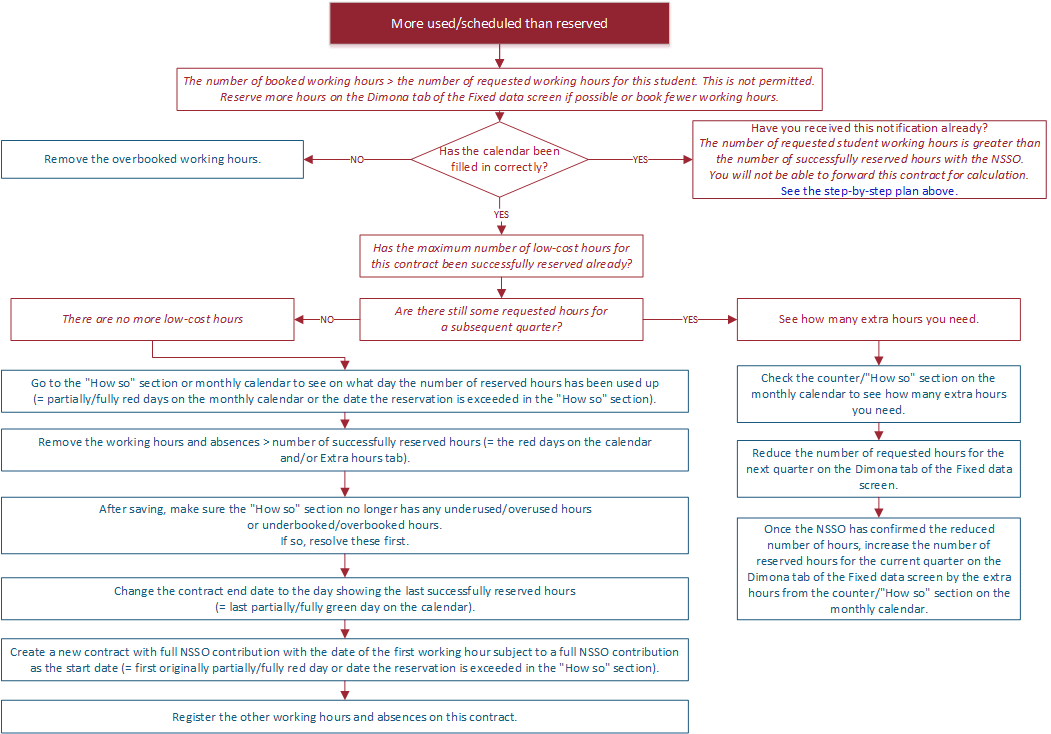
oMore used/scheduled than reserved
•Overlapping student contracts
•Late change of the end date of a contract
•Monthly calendar - counter and how so
By clicking in the chart you will be redirected to a page with more explanation and examples about the specific topic.
The step-by-step plans refer to relevant hours.
The following hours are counted as relevant hours:
•Hours worked, informal vocational training, formal vocational training, retraining in company, retraining in company by VDAB/Forem, compensatory leave, overtime.
•Pay codes: 7010 to 7089 + 7210 to 7219 + 7300 to 7309 + 7310 to 7319 + 7330 to 7339 + 7410 to 7419 + 7470 to 7479 + 7550 to 7579 + 75J0 to 75J9 and all 9-variations of these pay codes (like 9010, 9555,...).
Important: This concerns the hours in the monthly calendar as well as the hours in the Extra hours tab.
The following hours are not counted (as relevant hours):
•All other hours:
oPublic holidays, days of holiday, authorised absence, etc.
oHours worked under pay codes 8010 to 8089 and overtime under pay codes 8550 to 8579.
If the hours cannot be interpreted in case of overlapping student contracts, the counter on the Monthly calendar screen will color grey.
Yes, thereby solidarity contribution hours may be used if they do not represent a full working day.
However, this is only possible if the following three conditions are met:
•chronologically, first the Dimona declaration for the student contract with solidarity contribution must be submitted, then the Dimona declaration for the student contract with full NSSO contribution must be submitted;
•the contracts may only overlap by one day
•and the date of leaving of the student contract with solidarity contribution = the date of hiring of the student contract with full NSSO contribution.
It is possible that a student has several or overlapping contracts with the same employer. These details will be saved in Payroll, contract by contract. But at the NSSO these details are saved per INSZ number.
If hours have been requested for approval for several contracts, the NSSO will send back a total number of hours approved.
If the number of hours successfully reserved/approved by the NSSO is less than the total number of hours requested, Payroll will not know for which contract hours have not been approved. Payroll plays safe and deducts the rejected hours from both contracts.
Example:
Geoff has overlapping student contracts in 2018.
|
Hours requested |
Hours successfully reserved |
|---|---|---|
Contract 1 |
350 |
325 |
Contract 2 |
125 |
100 |
Total |
475 |
425 |
25 hours were not approved. Example: Student had already been working that year for another employer.
Payroll deducts those hours from both contracts.
Result:
•Total successfully reserved for contract 1 = 350 - 25 = 325 hours
•Total successfully reserved for contract 2 = 125 - 25 = 100 hours
It is not possible to postpone the date of leaving after the original date of leaving has passed.
Create a new student contract for the employment performed after the original date of leaving.
See also:
•Link to situations about late declaration of Dimona for students - Payroll
•Link to situations about late declaration of Dimona for students - other channels
For students, an additional item is visible on the detailed calendar: a visual display of the available student quota.
Counter student working hours
Example: contract from January until March 2018
February 2018 March 2018
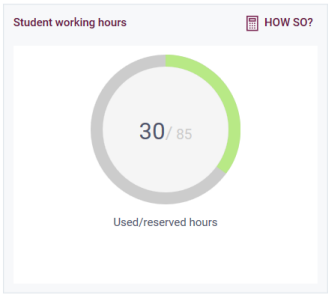
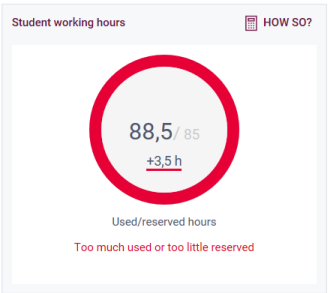
•It shows the number of used hours until and included the month in question with regards to the number of reserved hours in the quarter in question.
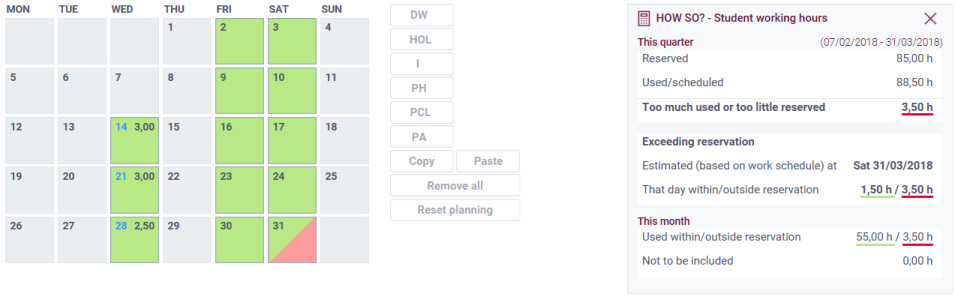
In this example 85 hours are reserved in the first quarter of 2018. In January and/or February, 30 hours or used, in March the number of total hours is 88,5 hours. At the end of the quarter, 3,5 are more used than there are reserved hours.
•Can the month in question be calculated?
oIf the circle is green = the month can be calculated - student quota-wise.
oIf the circle is red = the month cannot be calculated. A brief reason is then displayed.
oIf the circle is grey = there is not enough data to be able to interpret the hours. A brief reason is then displayed.
Example :
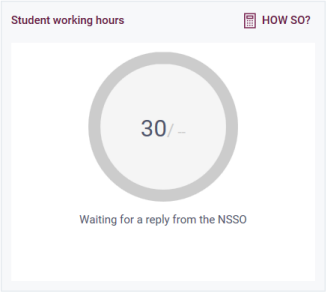
How so
Use the  button to get more information. Meanwhile the days where there are hours for the student are in colour on the calendar and/or the Extra hours tab.
•This quarter
oThe number of reserved hours
oThe number of hours used or scheduled
Only the relevant hours are counted here for all the months of the quarter, regardless of the month you have opened in the calendar.
oThe balance.
oIf more hours have been used or scheduled than were reserved in the course of the month, then day is shown on which the excess of hours takes place and how many hours are within/outside reservation.
•This month
oThe number of reserved hours that have been used (coloured green in the calendar) versus the number of hours that were not reserved (shown in red on the calendar).
oNot to be included: these are the irrelevant hours (in yellow on the calendar). See also: Relevant hours.
Example :
February 2018
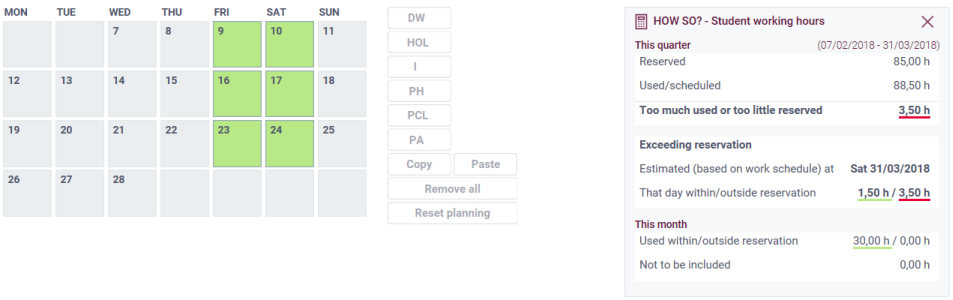
Even though everything is in order for February, you already see in the how so that there are hours posing problems - the hours underligned in red. Based in the currently reserved and used hours, the reservation is exceeded at the end of the quarter. When you go to March, you will also see in the calendar which day poses a problem:
If there are extra hours present, you will see this symbool  or
or  on the Extra hours tab. These hours may or may not be included at the end of the month in the calculation of reserved hours, depending on the colour:
•green or green line(s) = hours within the student quota and therefore counted as reserved hours;
•red of red line(s) = hours outside the student quota and therefore counted as hours outside the reservation.
•yellow line(s) = irrelevant hours