Declaration Dimona lateness and students - Payroll |

|

|

|
|
Declaration Dimona lateness and students - Payroll |
|
|

|
Declaration Dimona lateness and students - Payroll |
|
|
|
|
Declaration Dimona lateness and students - Payroll |
|
|
|
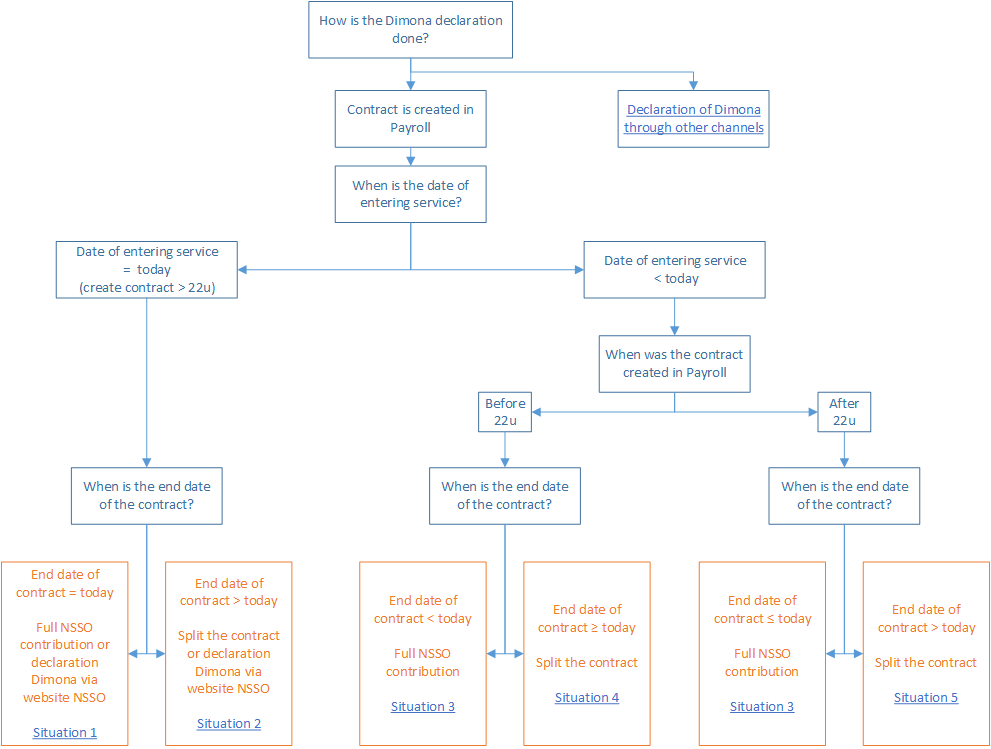
When is a Dimona declaration late?
•date of hiring < today or
•date of hiring = today and the contract is saved in Payroll after 22:00.
Example: Today, Tom spent 8 hours working as a student for employer X. Today is 11/01/2017. At 22:30, employer X creates a contract for Tom in Payroll specifying the employment start date and the employment end date at 11/01/2017.
For one-day contracts created in Payroll after 22:00, we are unable to guarantee timely submission of the Dimona declaration.
Only a timely Dimona declaration entitles you to the reduced solidarity contribution for students.
You have two options open to you:
•either you create a student contract in Payroll with the full social security contribution and the following details:
Date of hiring |
Today’s date |
|---|---|
Group |
•The student is > 19 years of age or will be turning 19 this year •The student is < 19 years of age and will not be turning 19 this year. Special group with description < 19-year-olds. |
Nature (Type) of contract |
Student |
Status |
Select what is applicable. |
Duration |
Fixed term (is filled in automatically when you choose student in the field Nature (Type) of contract) |
Date of leaving |
Today’s date |
Special status |
The value Students (only solid. contr.) will be proposed automatically. Select a different value. |
•or you file a Dimona declaration today before midnight at the NSSO website. In that case, the Dimona declaration is still on time.
Based on the details entered at the NSSO website, Payroll then readies a contract. Always make sure you check this contract. You may need to complete certain details in the contract.
oIf the student has previously worked with you under the same status, Payroll will automatically load all details.
oIf this is not the case (contract can be recognised by in front of the employee’s name), you will still need to enter any missing details yourself. You can do so by clicking the Complete contract’ button.
Comment:
A new employment contract does not need to be created.
Tip!
From now on, register your student workers in Payroll before they start work, so you comply with the legal dispositions of Dimona and you do not forfeit the reduced solidarity contribution.
Example: John works 32 hours spread across 4 days as a student for employer X, starting on 11/01/2017. Today is 11/01/2017. Employer X creates a contract in Payroll for John at 22:30 specifying 11/01/2017 as the employment start date and 13/01/2017 as the employment end date. The Dimona declaration for 11 January is late; the declaration for 12 and 13 January is on time.
For contracts that start today and end at some point in the future, we are unable to guarantee a timely Dimona declaration if these contracts were created in Payroll after 22:00.
Only a timely Dimona declaration entitles you to the reduced solidarity contribution for students.
You have two options open to you:
•either you split the contract: one contract for today with full social security contribution and one contract starting tomorrow with solidarity contribution.
oIn Payroll, change the employment start date of the student contract with solidarity contribution into tomorrow’s date (12/01 in this example). Save the contract.
See also: Creating a student contract.
oNow create a second student contract in Payroll with full social security contribution and the following details:
Date of entering service |
Today’s date |
|---|---|
Group |
•The student is > 19 years of age or will be turning 19 this year •The student is < 19 years of age and will not be turning 19 this year. Special group with description < 19-year-olds. |
Nature (Type) of contract |
Student |
Status |
Select what is applicable. |
Duration |
Fixed term (is filled in automatically when you choose student in the field Nature (Type) of contract) |
End-date contract |
Today’s date |
Special status |
The value Students (only solid. contr.) will be proposed automatically. Select a different value. |
•or you file a Dimona declaration today before midnight at the NSSO website. In that case the Dimona declaration is still on time.
Based on the details entered at the NSSO website, Payroll then readies a contract. Always make sure you check this contract. You may need to complete certain details in the contract.
oIf the student has previously worked with you under the same status, Payroll will automatically load all details.
oIf this is not the case (contract can be recognised by in front of the employee’s name), you will still need to enter any missing details yourself. You can do so by clicking the 'Complete contract' button.
Comment:
A new employment contract does not need to be created.
Tip!
From now on, register your student workers in Payroll before they start work, so you comply with the legal dispositions of Dimona and you do not forfeit the reduced solidarity contribution.
Example 1: Chris works 16 hours spread across 2 days as a student for employer X starting on 9/01/2017. Today is 11/01/2017. Employer X creates a contract in Payroll for Chris at 10:30 specifying 09/01/2017 as the employment start date and 10/01/2017 as the employment end date. This contract’s start and end date are both in the past. The Dimona declaration is late.
As an employer, you can no longer declare Chris as a student with solidarity contribution.
Only a timely Dimona declaration entitles you to the reduced solidarity contribution.
Change the following contract details and save the contract:
Group |
•The student is > 19 years of age or will be turning 19 this year •The student is < 19 years of age and will not be turning 19 this year. Special group with description < 19-year-olds. |
|---|---|
Nature (Type) of contract |
Student |
Status |
Select what is applicable. |
Duration |
Fixed term (is filled in automatically when you choose student in the field Nature (Type) of contract) |
Date of leaving |
Enter the end date |
Special status |
The value Students (only solid. contr.) will be proposed automatically. Select a different value. |
Comment:
A new employment contract does not need to be created.
Tip!
From now on, register your student workers in Payroll before they start work, so you comply with the legal dispositions of Dimona and you do not forfeit the reduced solidarity contribution.
Example 2: Paul works 16 hours spread across 2 days as a student for employer X starting on 10/01/2017. Today is 11/01/2017. Employer X creates a contract in Payroll for Paul at 23:00 specifying 10/01/2017 as the employment start date and 11/01/2017 as the employment end date.
As an employer, you can no longer declare Paul as a student with solidarity contribution.
Only a timely Dimona declaration entitles you to the reduced solidarity contribution.
Change the following contract details and save the contract:
Date of hiring |
Enter the employment start date |
|---|---|
Group |
•The student is > 19 years of age or will be turning 19 this year •The student is < 19 years of age and will not be turning 19 this year. Special group with description < 19-year-olds. |
Nature (Type) of contract |
Student |
Status |
Select what is applicable. |
Duration |
Fixed term (is filled in automatically when you choose student in the field Nature (Type) of contract) |
Date of leaving |
Enter the end date |
Special status |
The value Students (only solid. contr.) will be proposed automatically. Select a different value. |
Comment:
A new employment contract does not need to be created.
Tip!
From now on, register your student workers in Payroll before they start work, so you comply with the legal dispositions of Dimona and you do not forfeit the reduced solidarity contribution.
Example: Mary works 40 hours spread across 5 days as a student for employer X starting on 9/01/2017. Today is 11/01/2017. Employer X creates a contract in Payroll for Mary at 10:30 specifying 9/01/2017 as the employment start date and 13/01/2017 as the employment end date. The Dimona declaration for 9 and 10 January is late; the declaration for 11, 12 and 13 January is on time.
Only a timely Dimona declaration entitles you to the reduced solidarity contribution for students.
Split the contract as follows: a contract up until yesterday with full social security contribution and a contract starting from today with solidarity contribution.
•In Payroll, change the employment start date of the student contract with solidarity contribution into today’s date (11/01 in this example). Save the contract.
See also: Creating a student contract.
•Now create a second student contract in Payroll with full social security contribution and the following details:
Date of hiring |
Enter the original employment start date |
|---|---|
Group |
•The student is > 19 years of age or will be turning 19 this year •The student is < 19 years of age and will not be turning 19 this year. Special group with description < 19-year-olds. |
Nature (Type) of contract |
Student |
Status |
Select what is applicable. |
Duration |
Fixed term (is filled in automatically when you choose student in the field Nature (Type) of contract) |
Date of leaving |
Yesterday's date |
Special status |
The value Students (only solid. contr.) will be proposed automatically. Select a different value. |
Comment:
A new employment contract does not need to be created.
Tip!
From now on, register your student workers in Payroll before they start work, so you comply with the legal dispositions of Dimona and you do not forfeit the reduced solidarity contribution.
Example: Amber works 40 hours spread across 5 days as a student for employer X starting on 9/01/2017. Today is 11/01/2017. Employer X creates a contract in Payroll for Amber at 22:30 specifying 9/01/2017 as the employment start date and 13/01/2017 as the employment end date. The Dimona declaration for 9, 10 and 11 January is late; the declaration for 12 and 13 January is on time.
Only a timely Dimona declaration entitles you to the reduced solidarity contribution for students.
Split the contract as follows: a contract up until today with full social security contribution and one contract starting tomorrow with solidarity contribution.
•In Payroll, change the employment start date of the student contract with solidarity contribution into tomorrow’s date (12/01 in this example). Save the contract.
See also: Creating a student contract.
•Now create a second student contract in Payroll with full social security contribution and the following details:
Date of hiring |
Enter the original employment start date |
|---|---|
Group |
•The student is > 19 years of age or will be turning 19 this year •The student is < 19 years of age and will not be turning 19 this year. Special group with description < 19-year-olds. |
Nature (Type) of contract |
Student |
Status |
Select what is applicable. |
Duration |
Fixed term (is filled in automatically when you choose student in the field Nature (Type) of contract) |
Date of leaving |
Today's date |
Special status |
The value Students (only solid. contr.) will be proposed automatically. Select a different value. |
Comment:
A new employment contract does not need to be created.
Tip!
From now on, register your student workers in Payroll before they start work, so you comply with the legal dispositions of Dimona and you do not forfeit the reduced solidarity contribution.