Dimona declaration for student contracts |

|

|

|
|
Dimona declaration for student contracts |
|
|

|
Dimona declaration for student contracts |
|
|
|
|
Dimona declaration for student contracts |
|
|
|
You are obliged to make a Dimona declaration whenever an employee enters or leaves service.
The Dimona declaration for student contracts with solidarity contribution is subject to separate legislation.
Students with solidarity contribution can be easily identified by  next to their picture and name.
This page provides further information on:
•Extra fields for contracts with solidarity contribution
•Re-request student working hours
•Link to frequently asked questions
•Link to situations about late declaration of Dimona for students - Payroll
•Link to situations about late declaration of Dimona for students - other channels
Important! For students it is particularly important that the Dimona declaration is filed on time. Only a timely Dimona declaration entitles you to the reduced solidarity contribution. If you are late submitting the Dimona declaration or you exceed the permissible number of hours, then you as well as your working student(s) will be required to pay the full social security contribution.
Meaning: register your students before they start work in Payroll. Prefer to submit the Dimona declaration through a different channel (e.g. using the NSSO’s website)? In that case too, make sure you file the declaration before the student(s) start(s) work.
Note:
From 01/01/2023 to 31/12/2024, the number of low-cost hours (students on solidarity contribution) was increased from 475 hours to 600 hours. From 01/01/2025, the student quota is increased to 650 hours.
You recognise these contracts on the- tab Contract (Employees - Master data). The field Special Status contains the value Students (solid. contrib. only).
See also : Creating a contract for a student.
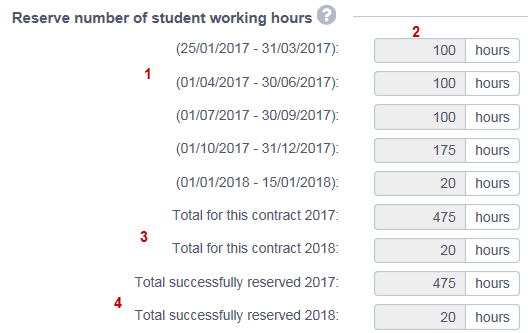
1 |
The periods stated are between the start-date and end-date of the student contract and are split up per quarter. |
||||
2 |
Enter the number of hours that you wish to employ the student during this period. Note |
||||
3 |
This is the total number of hours' employment of a contract that you wish to request from the NSSO. Note If the contract is spread over two years, there will be a line for each year. |
||||
4 |
This field contains:
|
||||
Total successfully reserved for this person |
During the calendar year, a student can have several contracts with the same employer. Here you can consult the total number of days approved for: •all contracts of •the same person with •the same employer. Note If the contract is spread over two years, there will be a line for each year. |
If an insufficient number of hours under a student contract have been approved by the NSSO, it is still possible to re-request the originally requested working hours via the button Re-request student working hours (via Employees - Master data - tab Dimona)
This action may help if:
•a different employer has since released working days for the student concerned
•there are problems involving the processing of the original application.